
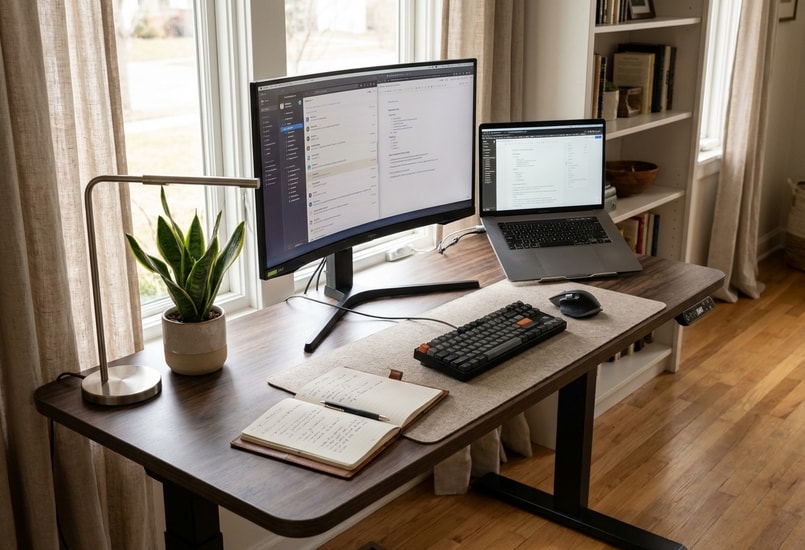
When Decoration and Storage Both Take Up Space
Some desk setups are arranged to look balanced rather than to support the way someone actually works.
Think about a desk with a large monitor in the center, matching accessories on either side, and a few carefully chosen decorative objects. It may look symmetrical and uncluttered. But a decorative tray might sit exactly where you need to open a notebook, while other accessories can leave little room for a laptop or an additional monitor. The arrangement looks balanced because everything has been placed to balance the picture, not because it supports what you do at the desk.
The same thing happens with storage. Giving every item a designated spot sounds reasonable. But if even the items you use throughout the day are tucked away in drawers, the desktop may look wonderfully clean, while you find yourself opening a drawer every time you need a pen or notebook. The desk looks tidy. But everyday tasks take longer.
These are two versions of the same problem. In one, decoration takes the space that work needs. In the other, storage takes the time that work needs. In both cases, the arrangement may look organized, but it hasn't been planned around the way the desk is actually used.
What a Desk Really Needs Is Room for Work in Progress
Adding more storage doesn't necessarily give you more room to work. It only gives you more places to put things.
A desk has to hold more than the equipment that stays in place. It also needs to accommodate the tasks you perform at your desk. You open a notebook. You spread out printed pages. You set a tablet beside your laptop. You move the keyboard back to make room for a document. None of that is storage. All of it needs space.
That's the difference between storage space and working space. Storage gives things a place to stay. Working space gives you room to use them. A desk can have plenty of drawers and organizers and still leave too little room to spread out a document.
This is especially noticeable on smaller desks. A monitor stand may create useful space underneath, but a large organizer on top can use up the room it creates. The desk gains storage and loses working space in the same move.
One useful approach is to identify the main area where you actually work. Keep that area reasonably clear. Place frequently used accessories nearby, and move occasional-use items to secondary storage.
The goal isn't to leave as much empty space as possible. It's to make sure the space you have is available when a task needs it.
--altImgStart--{"link":"https://s3.springbeetle.com/prod-us2-bucket/aesthetic-vs-functional-desk-setup_20261104_vXMdU9wr.png","alt":"Comparison of an aesthetic-focused desk setup with limited workspace and a functional desk setup with more room for everyday tasks."}--altImgEnd--
Arrange Your Desk Around Activities, Not Objects
There is no single desk layout that works for everyone. A setup that feels convenient for someone who mainly uses a desktop computer may be frustrating for someone who switches between a laptop, a notebook, and printed documents.
Instead of copying a desk setup you saw online, start by looking at what you actually do during a typical workday. Then arrange the desk around those activities, not around the objects you own.
A simple way to start is to organize your desk around three priorities. The primary work area is where the current task happens. The frequently used zone holds the items you pick up throughout the day. Secondary storage holds everything else: spare cables, extra stationery, occasional devices, and documents you don't need right now.
--altImgStart--{"link":"https://s3.springbeetle.com/prod-us2-bucket/desk-organization-workspace-zones_20261104_uXaw3gtP.png","alt":"Desk organization layout showing a primary work area, frequently used items, and secondary storage."}--altImgEnd--
Where an item belongs depends less on what it is and more on how often you use it and how quickly you need to reach it. A notebook you use every hour belongs within reach. A backup charging cable, even a small one, doesn't need to live on the desktop at all.
Here are three common setups, and how they change the layout.
Desktop computer. The monitor, keyboard, and mouse form the main work area. Keep enough room around the keyboard for comfortable use, and place a notebook or everyday stationery to the side where you can reach them without shifting your main equipment. Make sure there's enough clear space beside the keyboard for comfortable mouse movement.
Laptop and external monitor. The laptop needs room to sit open and connected without crowding the monitor. Plan for both devices before arranging anything else. If you mainly use the external monitor and don't need the laptop's screen, a vertical stand can keep the closed laptop out of the main work area. If you switch between the two screens often, arrange them so you don't have to twist your body to look from one to the other.
Computer work plus paper documents. If you regularly read, annotate, or write on paper, leave a dedicated area beside your keyboard or monitor for documents. Make sure you can spread out a few pages without moving your essential equipment every time you switch tasks.
The right layout isn't the one that looks most balanced. It's the one that matches what you actually do.
--altImgStart--{"link":"https://s3.springbeetle.com/prod-us2-bucket/desk-setup-layout-ideas_20261104_7bgeHS2u.png","alt":"Three desk setup ideas for desktop computer work, laptop and monitor use, and paper documents."}--altImgEnd--
Leave Room for Your Workspace to Change
A desk setup is rarely fixed forever. Work responsibilities change, new devices are added, and the way you use your workspace may look different a few months from now.
A layout that works well today might become inconvenient when you add a second monitor, start using a laptop stand, or need more room for paperwork. Leaving some room on the desktop makes those adjustments easier. A desk that is completely filled with accessories and organizers has to be reorganized every time something changes.
The same principle applies to cables, and this is where an ergonomic desk setup can go wrong in a way that's easy to miss. Cables should be organized, but they also need enough slack to accommodate movement. This matters even more with an electric standing desk. Monitor cables and other connected wires need enough slack to move with the desk without becoming stretched, tangled, or caught in the frame. If a cable is pulled tight every time the desk rises, the strain can damage connectors over time, and a power cord that works loose is more than an inconvenience.
--altImgStart--{"link":"https://s3.springbeetle.com/prod-us2-bucket/standing-desk-cable-management_20261104_a4y91CoN.png","alt":"Cable management on an electric standing desk with enough slack for height adjustment."}--altImgEnd--
Small desks benefit from the same approach, but every space decision matters more. Consider not only how much space an item takes up, but also how much room it needs when you're using it. An open laptop, a spread of documents, or even a frequently used notebook can take up more space than it appears to when put away.
Start by arranging the equipment you need for your main tasks, then see how much space remains for storage and decoration. A monitor stand or shelf can help free up room, but only if it doesn't create another obstacle. On a small desk, it's often more useful to keep fewer items within the main work area than to find a place for everything on the desktop.
A workspace is easier to maintain when its layout can accommodate new equipment and changing tasks without requiring a complete reorganization.
How to Tell If Your Desk Setup Is Actually Working
A desk can look organized and still be inconvenient. One of the best ways to evaluate a desk setup is to use it during a normal work session.
Spend a day at your desk and notice every time you have to move something, reach awkwardly, or pause to make room for a task. Those small interruptions are the real signal.
A few questions can make the check easier.
| Question | What it may reveal |
| Can you open a notebook without moving your keyboard or other essential equipment? | Your primary work area may be too crowded. |
| Can you reach frequently used items without moving other equipment or leaving your work area? | Everyday items may not be positioned conveniently. |
| Can you use your laptop and monitor at the same time without crowding the work area? | The layout may not account for the space both devices need. |
| Is there room to spread out documents when you need to? | Too much desktop space may be occupied by fixed equipment or storage. |
| Do the cables have enough slack when the desk moves? | Cable management may not account for desk movement. |
None of these require a perfect setup. They only require a layout that works for the tasks you actually do.
A Good Desk Setup Should Work Beyond the Photo
A beautiful desk can make a workspace more inviting. There's nothing wrong with choosing attractive accessories, coordinating colors, or keeping the desktop tidy.
But a desk that works is one you don't have to fight with. It's a desk where everyday items are easy to reach, work can happen without constantly moving things around, and the layout can adapt as your needs change.
That's a harder thing to photograph. It's also a better thing to live with.
Frequently Asked Questions
1. What makes a desk setup functional?
A functional desk setup makes everyday tasks easier without requiring you to constantly move equipment, search for supplies, or rearrange the desktop. It supports the tasks you perform regularly, keeps frequently used items easy to reach, and gives you enough room to work.
2. How do you organize a desk without making it look cluttered?
Separate frequently used items from things you only need occasionally. Keep essential equipment accessible, use drawers or nearby storage for less-used accessories, and avoid filling the entire desktop with organizers and decorations. Leaving some clear space for everyday tasks can make a desk feel less crowded without looking empty.
3. What should you keep on your desk?
Keep your essential work equipment, such as your monitor, keyboard, and mouse, along with the smaller items you use regularly, such as a notebook or phone. Items you only need occasionally can be stored nearby rather than taking up space on the desktop.
4. How do you make a small desk more functional?
When looking for small desk organization ideas, start with space allocation rather than storage. On a small desk, how you divide the available area matters more than how many organizers you add. Arrange the fixed equipment first, keep frequently used items within easy reach, and move occasional-use accessories into nearby storage. Consider not only how much space an item takes up when stored, but how much room it needs during use. Use vertical space only where it genuinely helps, and avoid adding organizers that take up more desktop space than they save.
5. Should a desk setup be minimalist?
Not necessarily. A minimalist setup can be easier to maintain, but removing everything from the desktop doesn't automatically make a workspace more practical. The best arrangement depends on what you use and how you work. A desk with a few well-placed accessories may be more functional than one that looks completely empty.
Written by the FlexiSpot Workspace Design Team. Based on FlexiSpot's internal workspace research and product design experience, with a focus on helping remote workers and professionals build ergonomic, productive spaces.