
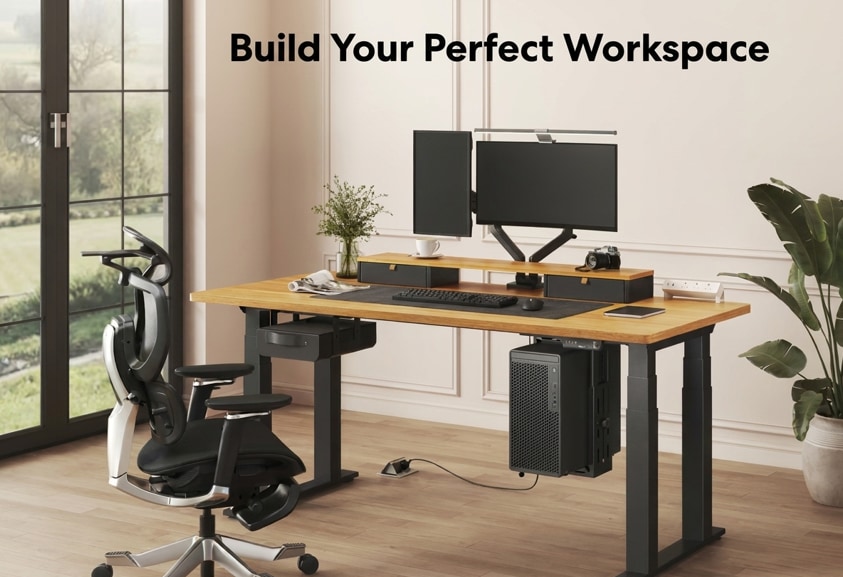
You probably know what you'd change about your current desk. The cables you keep trying to hide. The monitor that moves when you're typing. The pile of notebooks and gadgets you have to clear away just to get something done. Funny how the little things become the things you notice every day.
A better standing desk won't magically finish your work for you. But it can make your workspace a whole lot easier to live with.
This Black Friday, we're looking at three FlexiSpot standing desks that solve three very different frustrations: the E7 Pro, E7 Plus, and E7L. The trick is figuring out which problem you actually want to solve.
Three Desks. Three Reasons to Upgrade.
| If You're Tired Of... | Our Pick | What Changes |
| Limited legroom and messy cables | E7 Pro | More room to move beneath your desk and a cleaner, more organized setup |
| Noticeable desk movement with multiple monitors | E7 Plus | A four-leg foundation designed to provide more substantial support |
| Constantly clearing space to switch tasks | E7L | Two connected work areas that let different projects have their own space |
Found your match? Black Friday offers and available configurations may change throughout the sale, so check the current options before you buy.
E7 Pro: The Desk That Gets Out of Your Way
FlexiSpot E7 Pro Premium Standing Desk
Best for: People who want a cleaner, more comfortable home office without the little everyday annoyances.
You pull your chair closer. Stretch your legs. Plug in another device.
Your desk should make these things easy, not give you more to work around.
That's where the E7 Pro stands out. Its C-shaped frame places the supporting structure farther back, giving your legs more freedom to move beneath the desktop. It's the kind of thoughtful design detail you might not notice in a product photo, but can appreciate every time you sit down.
Then there's the cable management. With its under-desk organization features, the E7 Pro helps keep cords tucked away instead of hanging around your workspace. Less visual clutter, fewer cables getting in the way.
And when you're ready to stand, your preferred height is just a button press away. It's not about adding more features to your desk. It's about making the desk itself less of a distraction.
Our recommendation: If you want a workspace that feels more open, organized, and effortless to use, we'd start with the E7 Pro. It's a particularly appealing choice for a streamlined home office where the little details matter.
--altImgStart--{"link":"https://s3.springbeetle.com/prod-us2-bucket/flexispot-e7-pro-clean-home-office-standing-desk_20261119_K6bO7kDs.png","alt":"FlexiSpot E7 Pro electric standing desk with a C-shaped frame in an organized home office."}--altImgEnd--
E7 Plus: Go Ahead. Build the Setup You Really Want.
FlexiSpot E7 Plus 4-Leg Standing Desk
Best for: Multi-monitor workstations, larger desktops, and anyone who puts stability first.
You finally build the setup you've been planning.
A beautiful desktop. Two monitors. A proper monitor arm. Maybe speakers, a PC, or a few accessories that somehow keep finding their way onto your desk. Then you raise it to standing height, and every little movement becomes harder to ignore.
That's where the E7 Plus makes its case. Instead of the usual two-leg frame, it uses four lifting legs to create a more substantial foundation for your workstation.
Why does that matter? When you're working with multiple monitors, even small movements can become distracting, especially when a monitor arm makes them more noticeable.
The E7 Plus puts stability at the center of its design, making it a strong choice for people who regularly work while standing or prefer a larger, equipment-heavy setup.
Our recommendation: If you're investing in a serious workstation and stability is high on your priority list, we'd choose the E7 Plus. It's not a promise of zero movement, but its four-leg structure is a compelling reason to choose it over a conventional two-leg design.
One thing worth checking: the E7 Plus has a higher minimum frame height than the E7 Pro, so make sure it works for your preferred sitting position.
--altImgStart--{"link":"https://s3.springbeetle.com/prod-us2-bucket/flexispot-e7-plus-four-leg-multi-monitor-workstation_20261119_FvsnVARX.png","alt":"FlexiSpot E7 Plus four-leg height-adjustable standing desk with a large desktop and multi-monitor workstation."}--altImgEnd--
View the E7 Plus Standing Desk
E7L: Stop Making Room. Start Having Room.
FlexiSpot E7L Pro L-Shaped Standing Desk
Best for: Multitaskers, creative projects, and anyone whose work needs more than one dedicated space.
Your computer setup needs room. So does your notebook. And that project you started yesterday? It's still sitting exactly where you need to work today. Every time you switch tasks, something has to move.
What if you had space for both?
The E7L changes how you organize your work with an L-shaped desktop that creates two connected work areas. Keep your monitors and keyboard on one side. Leave the other open for writing, sketching, paperwork, or whatever you're working on next.
Instead of constantly rearranging everything, you can keep different projects within reach without having them compete for the same space.
And if your room has the right layout, the E7L can turn a corner into a workstation that feels intentionally designed around the way you work. Compatible reversible desktop configurations also let you choose which side the return sits on, making it easier to plan around your room.
Of course, you still get the freedom to switch between sitting and standing.
Our recommendation: If your workspace feels crowded because you're trying to do too many things in one place, the E7L is the one we'd choose. It's especially appealing for people who work across both digital and hands-on projects.
Just make sure your room can accommodate the L-shaped layout before ordering.
--altImgStart--{"link":"https://s3.springbeetle.com/prod-us2-bucket/flexispot-e7l-l-shaped-standing-desk-dual-workspace_20261119_L7orjS0b.png","alt":"FlexiSpot E7L L-shaped electric standing desk with separate computer and creative work areas."}--altImgEnd--
Explore the E7L L-Shaped Standing Desk
Before You Buy, Make Sure It Fits Your Life
You've found the desk that solves your biggest frustration. Now make sure it fits your room and the way you work.
Check your sitting height. A desk can look perfect and still sit too high for your preferred working position. Compare the minimum frame heights and remember to include the desktop thickness.
Think about what goes on top. Monitors, monitor arms, speakers, drawers, and accessories all affect how you use your desk. Choose a frame and desktop combination that supports your intended setup.
Measure beyond the desktop. Make room for your chair, your legs, and the space you need to move around. For the E7L, check both sides of the L-shaped layout and confirm which desktop orientation is available.
A few minutes of planning now can make a big difference in how well your new desk works for you.
Make This Black Friday Upgrade Count
The best standing desk isn't necessarily the biggest one, the one with the most legs, or the one with the longest feature list.
It's the one that solves the frustration you've been putting up with every day.
Whether that means fewer cables in your way, a more substantial foundation for your monitors, or finally having room for all your projects, the right upgrade should make everyday work feel a little easier.
FlexiSpot's Black Friday & Cyber Monday 2026 sale features changing offers on eligible furniture, including selected standing desks. Pricing, eligibility, and availability may vary as the event progresses.
Found your next desk? Check the available configurations and current promotions before you buy.
Explore FlexiSpot Black Friday Deals
Discounts vary by product and promotion. Offers may be subject to eligibility requirements, availability, and maximum savings limits. Review desktop compatibility, included accessories, product dimensions, and final pricing before purchasing.