
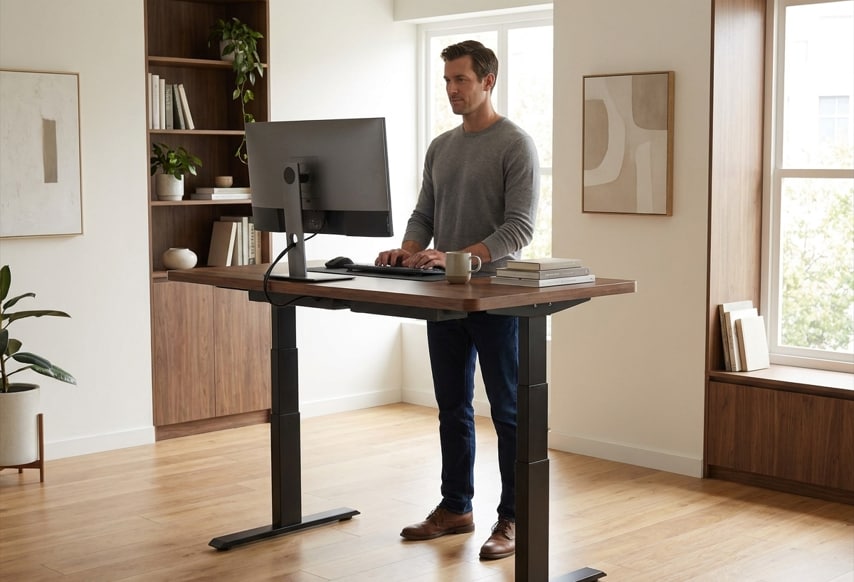
For tall users, choosing a standing desk is not simply a matter of finding the highest maximum height. A desk can reach 50 inches and still be a poor fit if your preferred working height is close to that limit. It may also feel less stable as it is raised, depending on the frame design.
A desk may technically reach your target height but leave very little room for adjustment above it. That can become especially relevant if your preferred working position changes over time, whether because of a different keyboard setup, footwear, posture, or workstation configuration.
You need enough height to match your working position, enough room above that position for adjustment, and enough stability to keep the work surface steady when the desk is raised. Maximum height is only one part of the equation.
Why Standing Desks Can Be Difficult for Tall People
Standing desks are designed around a range of working positions, but that range is not unlimited. For taller users, the challenge is often not finding a desk that adjusts at all. It is finding one that still has useful adjustment range when the work surface is already high.
A desk that works comfortably for someone around average height may leave less usable adjustment range for someone who is 6'2", 6'4", or taller. That makes the upper end of the adjustment range more important.
The problem is often the top of the range
For a tall user, a desk can appear suitable on paper because its maximum height looks impressive. But if your preferred standing position is only an inch or two below that maximum, you have very little room to fine-tune the desk.
This is where maximum height and height headroom become different concepts. Maximum height tells you the highest position the desk can reach. Headroom tells you how much adjustment remains after you reach your preferred working position.
Overall height does not tell the whole story
Your overall height is useful for narrowing down your options, but it does not determine your exact standing desk height.
Two people who are both 6'3" can have different arm, leg, and torso proportions. Their preferred desk positions may therefore differ even though their overall height is the same.
Rather than treating a height chart as a final answer, use your own standing working position to evaluate whether a desk's upper range is sufficient. The goal is to find a desk that covers your actual working position without forcing you to work very close to its upper limit.
--altImgStart--{"link":"https://s3.springbeetle.com/prod-us2-bucket/tall-user-standing-desk-height-comparison_20260904_e1mOwCM8.png","alt":"Standing desk height comparison showing how tall users may work closer to the upper adjustment range."}--altImgEnd--
Start With Your Preferred Standing Height
Your height can help narrow the options, but your actual standing position is what determines whether a desk fits.
Stand in your normal work position with your shoulders relaxed and your arms in a comfortable typing position. Use that position as your starting point, then fine-tune the desktop based on how your keyboard, mouse, posture, and equipment fit together.
For example, a 6'4" user might find their comfortable standing work surface around 46 or 47 inches, while a 6'6" user may need a surface closer to 49 inches, depending on their proportions. These numbers are only examples and should be verified against your own working position.
Once you have a practical target, compare it with the desk's actual finished height rather than relying on a general recommendation such as "for users over 6'2"."
A high maximum height is useful only if it gives you meaningful room above your normal working position. Conversely, a desk with a slightly lower maximum may be completely adequate if your working height falls comfortably within its range.
This is why the useful question is not simply "How tall are you?" It is "Where do you actually need the desktop to be, and how much adjustment remains above that point?"
What "Height Headroom" Means and Why It Matters
Maximum height is often the first specification tall users look for, but it does not tell you how comfortably that range will fit your preferred working position.
A desk advertised with a 50-inch maximum height simply means the desk can reach that position. It does not mean 50 inches is the right height for every tall user.
Here, height headroom refers to the difference between your preferred working height and the desk's maximum finished height. Having some headroom gives you more room to fine-tune your position instead of working close to the desk's upper limit. There is no universal amount of headroom that every tall user needs.
Think of maximum height as a ceiling, not a recommendation
Suppose the top of your desktop feels comfortable at approximately 47 inches when you are standing. A desk that reaches exactly 48 inches technically meets your requirement, but your preferred position sits very close to its upper limit.
A desk that reaches 51.6 inches gives you 4.6 inches of additional range above that target. It does not automatically make it a better desk—it simply gives you more room to adjust.
That distinction matters because your preferred working position can change. You might replace a keyboard, use a different monitor arm, change footwear, or discover that a slightly different standing position feels better.
For tall users, maximum height answers one question: Can the desk get high enough?
Height headroom answers another: How much flexibility do I have once it gets there?
Calculate your height headroom
Example:
- Preferred working height: 47 inches
- Desk A maximum height: 48 inches → headroom: 1 inch
- Desk B maximum height: 51.6 inches → headroom: 4.6 inches
Both desks reach your preferred height. Desk B simply leaves more room above it. That extra room should not be treated as a standalone measure of quality. It becomes useful when considered alongside stability, desktop dimensions, load capacity, and the way you actually use the desk.
--altImgStart--{"link":"https://s3.springbeetle.com/prod-us2-bucket/standing-desk-height-headroom-explained_20260904_R0FafKKN.png","alt":"Standing desk height headroom illustrated between preferred working height and maximum desk height."}--altImgEnd--
For Tall Users, Think About Four Layers of Fit
For tall users, a standing desk should pass four basic fit checks before you worry about individual specifications:
1. Does the finished desktop reach your preferred working height?
This is the basic requirement. If the desk cannot reach the position where you work comfortably, the rest of its specifications do not matter.
2. How much room remains above that height?
This is your height headroom. It is not a universal requirement, but it tells you how close your preferred position is to the desk's upper limit.
3. How stable is the desk at that actual height?
A desk can reach your preferred position and still feel different once it is raised. Evaluate stability where you actually expect to work, not only at the lowest setting.
The FlexiSpot Comprehensive Laboratory uses controlled height-specific stability testing to examine how a standing desk responds to horizontal forces at different working heights. This type of testing is useful because stability can change as lifting columns extend, making the desk's behavior at a low sitting height an incomplete picture of its performance at a tall user's preferred standing height.
A typical laboratory test setup can use a 60-inch desktop with a defined load, while horizontal force is applied from multiple directions at the desktop. Displacement can then be measured with infrared sensors to quantify how much the work surface moves under the applied force. The purpose is to evaluate movement under a controlled condition rather than to assign a universal "stability score" to every desk.
--altImgStart--{"link":"https://s3.springbeetle.com/prod-us2-bucket/flexispot-comprehensive-laboratory-standing-desk-stability-testing_20260904_MKinmiyg.jpg","alt":"FlexiSpot Comprehensive Laboratory testing standing desk stability at different working heights."}--altImgEnd--
4. Does the workspace support your working position comfortably?
At a higher standing position, your monitor height, keyboard placement, and desktop depth can also affect how comfortably you work. Check whether your monitor can be positioned at a comfortable eye level, whether your keyboard and mouse remain within easy reach, and whether the desktop depth forces you to lean forward to use your equipment.
Quick Reference: What to Check
| What to check | Why it matters |
| Preferred working height | Tells you where the desk needs to work for your body |
| Finished desktop height | Shows whether the desk actually reaches your target |
| Height headroom | Shows how much adjustment room remains above your preferred height |
| Stability at working height | Shows how the desk performs where you actually use it |
| Desktop depth | Determines whether your keyboard, monitor, and other equipment fit comfortably |
Why Standing Desk Stability Matters at Taller Heights
For tall users, reaching the right desk height is only half the problem.
As a standing desk rises, more of the lifting columns extend upward. Depending on the frame design, movement at the work surface may become more noticeable as the desk approaches the upper part of its range.
A desk can be high enough but still feel different at that height
Two desks can both reach 50 inches. On paper, they appear to solve the same height requirement. In everyday use, however, they may not feel identical once raised.
This matters because taller users may need to work closer to the upper portion of a desk's adjustment range. A desk that feels stable at 30 inches does not necessarily provide the same experience at 48 or 50 inches.
This height-dependent behavior is also why the FlexiSpot Comprehensive Laboratory evaluates standing desk movement at defined working heights rather than relying on a single measurement at the lowest position. The test approach focuses on measurable desktop displacement under controlled horizontal loading, allowing height to be considered as part of the stability assessment.
How We Test: The FlexiSpot Comprehensive Laboratory has developed a standardized stability testing protocol using a 100 N horizontal force applied from the front of a 60-inch desktop with a 100 lb load. Infrared measurement can be used to track displacement at the desktop corners during simulated typing and leaning conditions. This testing framework is intended to help evaluate the stability difference that can occur as the desk is raised, rather than treating stability as a single fixed characteristic.
Learn more about standing desk wobble: Why Standing Desks Wobble and What to Look For
Your equipment changes the equation
The workstation itself also matters. A lightweight laptop setup places different demands on a desk than a large desktop computer, multiple monitors, monitor arms, speakers, and other accessories.
For users with heavier setups, evaluate the desk as a complete system. Load distribution and desktop configuration can affect how movement is perceived during normal typing and mouse use.
The goal is not to eliminate every small movement. It is to find a setup where movement does not interfere with the work you actually do.
Does a Four-Leg Standing Desk Make a Difference for Tall Users?
Tall users often ask whether they need a four-leg standing desk. The answer depends less on height alone and more on where you work within the desk's adjustment range and what you place on the desktop.
A four-leg design is not a requirement for tall users, but it can be a useful option for certain high-position, heavy-workstation setups.
When a two-leg desk may be enough
A two-leg standing desk can be a practical choice if:
- Your preferred standing height is comfortably below the desk's maximum
- You use a relatively light setup
- Your desktop is not unusually large
- Movement is not distracting at your normal working height
--altImgStart--{"link":"https://s3.springbeetle.com/prod-us2-bucket/e7-two-leg-standing-desk-tall-users_20260904_HupKJ8by.png","alt":"FlexiSpot E7 two-leg standing desk for tall users."}--altImgEnd--
Being tall does not automatically make a two-leg desk unsuitable.
When a four-leg design may be worth considering
A four-leg standing desk may be worth considering when:
- Your preferred working height is close to the upper end of the range
- You use a large desktop or heavier workstation
- You have multiple monitors or other heavy equipment
- Stability is one of your highest priorities
--altImgStart--{"link":"https://s3.springbeetle.com/prod-us2-bucket/e7-plus-max-four-leg-standing-desk-tall-users_20260904_CWwIT5Cy.png","alt":"E7 Plus Max four-leg standing desk for tall users."}--altImgEnd--
A four-leg design can offer a different approach to frame support, particularly in larger or heavier workstation configurations. However, leg count alone does not determine stability. The complete frame design and workstation configuration still matter.
The FlexiSpot Comprehensive Laboratory's testing framework also treats leg count as only one variable. Column thickness, frame geometry, desktop size, load distribution, and working height can all affect measured desktop movement. For that reason, a four-leg configuration should not be presented as automatically more stable in every situation without considering the complete desk configuration.
The key distinction: stability at your working height
The useful question is not simply "two legs or four legs?" It is "How does this desk perform at the height where I will actually work?"
That is the position you should evaluate when comparing stability.
What to Look for in a Standing Desk for Tall Users
Once you have established these four basic fit requirements, product specifications can help you compare individual desks.
1. Maximum finished desktop height
Start with the simplest question: can the desk reach your working height? Check the manufacturer's actual finished desktop height rather than relying on a frame-only specification. If the listed height excludes the desktop, account for the thickness of the surface you plan to use.
2. Height headroom
Once you know your preferred standing height, subtract it from the desk's maximum finished height. The result shows how much room remains above your target. More headroom is not automatically better, but a very small difference can leave you with little flexibility.
3. Stability at your working height
Do not judge stability only at the desk's lowest position. If your preferred standing height is near the upper end of the range, look for testing or reviews that evaluate the desk at a comparable height.
When reviewing stability claims, it is also useful to ask how the test was performed. A result is more informative when the testing height, desktop size, applied load, force direction, and measurement method are clearly defined.
4. Frame and column design
Frame construction and lifting-column design can affect both the height range and the stability of a standing desk. Three-stage lifting columns can help a desk cover a wider vertical range, although the actual range depends on the frame design and column dimensions. For taller users, this can make it easier to achieve a high standing position without sacrificing the lower end of the range.
5. Load capacity
Consider the complete workstation rather than the desktop alone. Add up the approximate weight of your computer, monitors, monitor arms, speakers, and other equipment. Then compare that total with the manufacturer's published load rating and check whether the rating refers to lifting capacity, static capacity, or both.
6. Desktop depth and reach
A tall user does not automatically need a deeper or larger desktop. Choose enough depth for your monitor and equipment while keeping your keyboard, mouse, and other frequently used items within a comfortable reach. More surface area is useful only when you can organize and use it effectively.
How Different Standing Desk Designs Compare for Tall Users
If your preferred working height is near the upper end of a desk's range, comparing models can help illustrate how different frames approach height, stability, and load capacity.
There is no single best standing desk for every tall user. The better choice depends on your preferred working height, available headroom, stability needs, and workstation setup.
Specifications can vary by configuration, so check the manufacturer's current product page for the exact details before making a purchase. Published load ratings are not directly comparable because manufacturers may define lifting and static capacity differently.
| Feature | FlexiSpot E7 Plus | FlexiSpot E7 Plus Max | FlexiSpot E7 Plus Max 2.0 | UPLIFT V3 4-Leg |
| Height Range | 26"–51.6" | 25.8"–51.4" | 25.8"–51.4" | 22.6"–48.7" (with 1" desktop) |
| Leg Configuration | 4-leg, 3-stage | 4-leg, 3-stage | 4-leg, 3-stage | 4-leg, 3-stage |
| Motor System | Dual motor | Quad motor | Quad motor | Quad motor |
| Load Capacity | 440 lbs | 660 lbs | 793 lbs | 535 lbs |
| Frame Only Price | $499.99 | $719.99 | $819.99 | $959 |
| Frame + 48" x 30" Laminate Price | $579.99 | $809.99 | $909.99 | $959 |
| Why It May Matter | High maximum height | Higher Load capacity | Highest Load capacity | Lower minimum height |
Prices and specifications are based on manufacturer website data as of September 1, 2026. They do not necessarily represent the actual prices, availability, or specifications at the time you view this article. Please check the manufacturer's website for the most current information before making a purchase.
If your preferred finished standing height is 49 inches, a desk with a 48.7-inch maximum height does not meet that requirement. A desk with a 51.6-inch maximum height, by comparison, leaves 2.6 inches of headroom above your target.
That difference illustrates why maximum height should be treated as one part of the decision rather than the entire decision.
How to Test a Standing Desk at Your Height
If you can test a standing desk before buying it, do not evaluate it only at sitting height or at the desk's absolute maximum.
Raise the desk to approximately your preferred standing height and use it as you normally would.
Test the desk at your target height
Set the desktop close to the position where you expect to spend most of your standing time. If your preferred height is 47 inches, for example, test the desk around 47 inches rather than automatically raising it to the highest possible setting.
Work normally for a few minutes
Type normally. Move the mouse. Adjust your monitor. Reach for something you use frequently. Pay attention to whether the work surface feels secure during ordinary movements. You are not trying to eliminate every small amount of movement—the useful question is whether any movement is noticeable enough to interfere with your work.
This type of hands-on evaluation mirrors the logic used in controlled laboratory testing: evaluate the desk under the conditions that matter to the user rather than relying only on a specification such as maximum height or published load capacity.
FlexiSpot Comprehensive Laboratory Recommendation: When possible, spend at least 15 minutes at your intended working height during a test. This is a practical evaluation guideline, not a universal testing standard. What feels acceptable initially may become distracting over time, particularly with high-resolution monitors where even small vibrations can be noticeable.
Test the upper range separately
If your preferred working height is close to the desk's maximum, raise it farther and compare how it feels. This does not mean the desk needs to feel identical at every height. Instead, it helps you understand how the frame behaves as it approaches the upper part of its adjustment range. For tall users, this can reveal a difference that a specification sheet alone cannot show.
Frequently Asked Questions
1. What is the best standing desk for someone who is 6'4" or taller?
For someone 6'4" or taller, look for a desk that reaches your preferred finished desktop height without placing you at the very top of its range. Stability at that height and enough workspace for your setup also matter.
2. Is maximum height more important than height headroom for tall users?
Maximum height comes first because the desk must reach your preferred working position. Once it does, height headroom helps show how much adjustment room remains above that position.
3. What is the ideal standing desk height for someone who is 6'4"?
There is no single ideal height based only on being 6'4". Your preferred height depends on your standing posture, arm position, keyboard setup, and proportions, so use your actual working position as the reference point.
4. Is a 50-inch standing desk high enough for tall people?
It may be. The important question is whether your preferred working height falls comfortably below 50 inches and leaves enough adjustment room for your setup.
5. What is height headroom on a standing desk?
Height headroom is the difference between your preferred working height and the desk's maximum finished height. It shows how much adjustment room remains above your normal standing position.
6. Do tall people need a four-leg standing desk?
Not necessarily. A two-leg desk can work well if it reaches your preferred height and remains stable there. A four-leg design may be worth considering for higher working positions or heavier workstation setups.
7. Are four-leg standing desks more stable?
A four-leg design can provide additional structural support, but leg count alone does not determine stability. The frame design, desktop, equipment load, and working height all affect how a desk performs.
8. Can a standing desk be too high for a tall person?
Yes. A standing desk can be too high if it forces you to raise your shoulders, reach upward to the keyboard, or work with your elbows in an uncomfortable position. Lower it until the workstation feels natural.
9. How can I test a standing desk if I am tall?
Raise the desk to your expected working height and use it normally for several minutes. Pay particular attention to stability and movement at the height where you expect to spend most of your standing time.
Final Takeaway
For tall users, choosing a standing desk is not simply about finding the highest number on the specification sheet.
Start with your preferred standing working height. Then check whether the finished desktop can reach it, how much height headroom remains above it, and how stable the desk feels at that position.
Laboratory testing can add another layer of context by examining stability under controlled conditions and at defined working heights. But laboratory measurements should be used alongside the user's actual workstation setup rather than treated as a substitute for hands-on evaluation.
A desk does not need the highest maximum height to work well for a tall user. The better choice is the one that reaches your preferred working height, leaves enough room above it, stays stable there, and gives you enough workspace to work comfortably.
Reviewed by: FlexiSpot Product Engineering Team & FlexiSpot Comprehensive Laboratory