
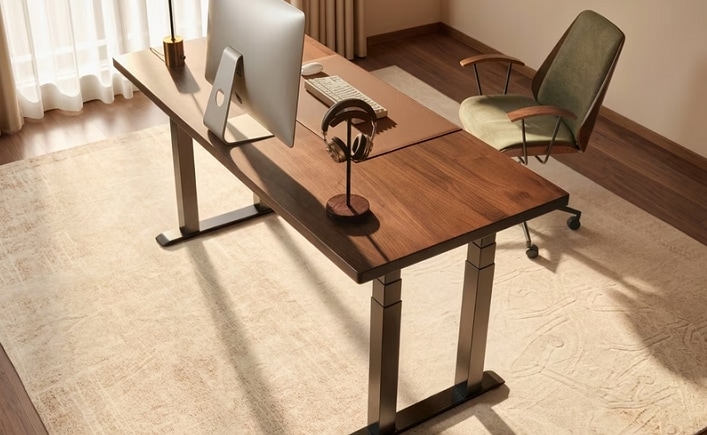
Remember when your home office was supposed to be temporary? A desk in the corner, a chair you already owned, maybe a monitor balanced on a stack of books. Then the meetings multiplied, the cables took over, and somehow, that temporary setup became the place where you spend half your day.
Maybe it's time for a makeover. But a better home office doesn't necessarily mean a bigger room, more furniture, or a complete redesign. Sometimes, it's about organizing a workstation around the way you actually work. Sometimes, it's creating a more substantial setup that feels right for the space. And sometimes, it's finding furniture that makes your living room feel like a living room again.
Black Friday is a great opportunity to rethink your workspace, but the smartest upgrade isn't always the biggest purchase. Start with the one change that would make the most difference to your day.
Three Workspaces. Three Ways to Make Them Better.
| Your Home Office Problem | The Makeover | Where We'd Start |
| A crowded desk with multiple monitors and devices | Create a workstation organized around your workflow | E7 Plus Standing Desk + C7 Max Foam Chair (optional) |
| A work area that needs more room, support, and a more refined feel | Build a premium workspace with a substantial desk and comfortable executive seating | E7 Plus Max Standing Desk + R7 Executive Office Chair |
| A work area that looks out of place in your home | Create a warm, furniture-inspired workspace that blends into your living space | Fusion Nordic + WC4 Lounge Chair |
You don't need to replace everything. First, figure out what's making your current setup frustrating, then decide which changes are worth making.
Makeover 1: The Workstation That Finally Fits Your Work
Stop Squeezing a Serious Setup Onto an Ordinary Desk
It probably started with one monitor. Then came a second, a monitor arm, speakers, a laptop, or maybe a drawing tablet. Now your desktop is full, and every time you move something, something else gets in the way. This makeover isn't simply about buying a bigger desk; it's about designing a workstation around what you actually do.
The makeover: Design around your workflow, not your equipment list.
Before deciding you need more desktop space, consider which screen gets most of your attention, which devices need to stay within reach, and which accessories could move onto a monitor arm, shelf, or nearby storage. Keep your primary monitor in front of your usual working position, arrange additional screens based on how frequently you use them, and give your keyboard and mouse enough room without crowding the entire desktop.
A monitor arm can free up valuable space, but check its compatibility with your desktop thickness, edge design, and under-desk frame. If you regularly switch between sitting and standing, think about how your equipment behaves when the desk is raised. The goal isn't to fit more things onto the desk, but to give everything a place that makes sense.
The furniture: FlexiSpot E7 Plus, with C7 Max Foam as an optional seating upgrade
For a more demanding workstation, we'd start with the E7 Plus. Its four-leg design creates a more substantial foundation than a conventional two-leg standing desk, making it an appealing option for larger desktops and multi-monitor arrangements. That's especially relevant if you regularly work at standing height, where movement can become more noticeable through monitor arms and screens.
For seating, the C7 Max Foam is worth considering if you prefer a supportive, layered foam seat and extensive ergonomic adjustments. However, it isn't a must-have just because you use multiple monitors. The right chair depends on your body dimensions, sitting preferences, and how well the adjustments work for you. If your existing chair already fits well, keep it and focus your budget on the part of your workstation that needs improving.
Our recommendation: The E7 Plus is a strong starting point when your workstation needs more substantial structural support. However, four legs don't guarantee zero movement, and you should confirm equipment weight, desktop compatibility, monitor-arm requirements, and your preferred sitting height before purchasing. If you're considering the C7 Max Foam, remember that its supportive seat may feel firmer than some people expect.
--altImgStart--{"link":"https://s3.springbeetle.com/prod-us2-bucket/flexispot-home-office-makeover-e7-plus-c7-max_20261127_5AkSMY04.png","alt":"flexispot-home-office-makeover-e7-plus-c7-max.png"}--altImgEnd--
Explore the E7 Plus Standing Desk
Explore the C7 Max Ergonomic Office Chair
Makeover 2: A Workspace That Feels Like a Serious Upgrade
Give Your Home Office the Space and Presence It Deserves
Maybe your home office works well enough, but it still feels like a collection of things you bought at different times. The desk is getting crowded, your chair doesn't quite match the room, and the whole setup feels more temporary than you'd like. You've organized the cables and moved things around, but you're ready for a workspace that feels more intentional.
The makeover: Build around comfort, space, and a clear visual hierarchy.
Start with the desk itself. Rather than placing equipment wherever it fits, decide what deserves the center of your workspace. Keep your primary monitor directly in front of your normal seated position, position secondary equipment according to how frequently you use it, and leave enough clear surface for paperwork, writing, or simply setting down a cup of coffee. A larger desk is most useful when the extra space gives you room to work, not just room to collect more things.
Then consider the rest of the room. Give the desk enough clearance for comfortable movement, choose lighting that works for both focused tasks and video meetings, and think about what appears behind you on calls. A nearby cabinet or shelf can hold supplies you don't need every day, while a consistent mix of materials and finishes helps the workspace feel more cohesive. The goal isn't to copy a corporate executive office. It's to create a home office that looks and functions like it was designed for you.
The furniture: FlexiSpot E7 Plus Max Standing Desk + R7 Executive Office Chair
The E7 Plus Max brings a more substantial foundation to this setup. Its four-leg, four-motor design provides independent lifting power at each leg, making it well suited to larger desktops, heavier workstation equipment, and users who place a high priority on desk stability. Its three-stage lifting columns offer a broad adjustment range, while the integrated cable-management features help keep a premium setup looking organized.
At first glance, the E7 Plus and E7 Plus Max look remarkably similar. Both have four legs and a clean, substantial silhouette. The differences become much easier to spot when you look underneath the desktop. While the E7 Plus uses two main crossbeams and a dual-motor system, the E7 Plus Max features four crossbeams and four motors, with one motor dedicated to each leg. Its reinforced frame has a more substantial, closely connected appearance, giving the Max a visibly heavier-duty structure rather than simply a different exterior style.
The difference isn't just cosmetic. Those additional crossbeams create a more rigid connection between the legs, while the four-motor system provides greater lifting capability for demanding setups. The E7 Plus Max also features magnetic cable management that helps keep visible wiring under control. It's a more engineered-looking frame once you see the details, even if both desks appear similar in a typical home office photo.
--altImgStart--{"link":"https://s3.springbeetle.com/prod-us2-bucket/flexispot-e7-plus-max-four-crossbeam-frame-detail_20261127_SsrnVGH0.png","alt":"The E7 Plus Max uses four reinforcing crossbeams, compared with two on the standard E7 Plus. Its heavier-duty structure is most visible from underneath the desk."}--altImgEnd--
Pair it with the FlexiSpot R7 Napa Leather Executive Office Chair, and the workspace takes on a different character. The R7 combines a generously sized, thickly cushioned seat with Napa leather upholstery and distinctive design details. Available finishes, including beige with woodgrain accents and black with silver accents, offer different ways to complement the room. With adjustable seat depth, seat height, and headrest positioning, it also gives users ways to tailor the seating experience.
Together, the E7 Plus Max and R7 make sense for someone who wants a substantial desk for focused work and a more refined chair for seated tasks, meetings, and reading. The Max's reinforced four-crossbeam structure and four-motor system offer a meaningful upgrade over the standard E7 Plus for users who need more lifting capability and prioritize a more rigid desk frame. Meanwhile, the R7 emphasizes cushioned executive seating rather than the mesh-and-foam ergonomic design of the C7 Max.
Our recommendation: We'd choose this combination for someone planning a more substantial home office upgrade, especially if they use a larger desktop, have demanding equipment, and care about the overall look of their workspace. It isn't automatically the better choice for everyone. The desk still needs to fit the room, and the R7's upholstered executive design may not suit someone who prefers a breathable mesh chair. Confirm desk dimensions, lifting requirements, monitor-arm clearance, chair height, and available finishes before ordering. Four motors and four legs improve the foundation, but no standing desk should be expected to remain completely motionless at every height.
--altImgStart--{"link":"https://s3.springbeetle.com/prod-us2-bucket/flexispot-home-office-makeover-e7-plus-max-r7_20261127_e5o5LTJ2.png","alt":"FlexiSpot E7 Plus Max four-motor standing desk paired with an R7 Napa leather executive office chair in a modern home office."}--altImgEnd--
Explore the E7 Plus Max Standing Desk
Explore the R7 Napa Leather Executive Office Chair
Makeover 3: The Office That Disappears After Hours
Keep the Workspace. Get Your Living Room Back.
Not everyone has a separate room for work. Sometimes, the desk sits beside the sofa, shares space with a guest bedroom, or is the first thing you see when you walk through the front door. You need that workspace during the day, but when the laptop closes, you don't want the entire room to keep reminding you of work.
The makeover: Make work easy to put away.
Start by looking at your workspace from the rest of the room. Does it dominate the space? Are papers, chargers, and accessories always visible? Try grouping everyday work supplies into categories and giving each one a dedicated storage spot. Keep the things you use constantly within reach and make everything else easy to put away when you're finished.
Consider warmer lighting, a restrained color palette, and accessories that complement your existing furniture. Instead of adding more organizers on top of the desk, think about whether built-in storage could help keep the surface clear. You don't have to hide your home office; you just want it to feel like part of your home.
The furniture: FlexiSpot Fusion Nordic Standing Desk + WC4 Lounge Chair
This is where Fusion Nordic and the WC4 Lounge Chair make a surprisingly natural pair.
The desk doesn't disappear when the workday ends. The clutter can. Fusion Nordic's integrated drawers give notebooks, chargers, and everyday essentials somewhere to go, while its built-in power access keeps charging convenient without taking over the desktop.
Now add the WC4. With its gracefully curved laminated hardwood frame, upholstered cushioning, and gentle rocking motion, it brings a completely different personality to the workspace. Instead of making your living room look like a corporate office, the combination feels more like thoughtfully chosen furniture that happens to accommodate work.
There's something appealing about having a space where you can answer a few emails, close your laptop, and lean back with a book without feeling like you've never left the office.
Of course, the WC4 is a lounge chair, not a traditional ergonomic task chair. Its fixed armrests, rocking design, and more limited adjustments make it better suited to casual laptop use, reading, or relaxing than extended keyboard-and-monitor work. If you spend most of your day at a computer, a dedicated adjustable office chair may be the more practical choice.
Our recommendation: If your workspace shares a living room or bedroom and visual harmony matters just as much as functionality, Fusion Nordic and WC4 are an appealing combination. Fusion Nordic provides height adjustment and organized storage, while WC4 brings warmth, character, and a more relaxed seating experience. Just make sure the chair's seat height, armrest clearance, and rocking movement work with your intended setup.
--altImgStart--{"link":"https://s3.springbeetle.com/prod-us2-bucket/flexispot-home-office-makeover-fusion-nordic-wc4_20261127_XVBXcUba.png","alt":"FlexiSpot Fusion Nordic height-adjustable standing desk paired with a WC4 laminated hardwood lounge chair in a warm, modern living space."}--altImgEnd--
Explore the Fusion Nordic Standing Desk
Before You Start: Three Questions Worth Asking
A home office makeover can be exciting, especially when Black Friday offers make bigger upgrades more tempting. But before you start filling your cart, consider three things.
What actually needs replacing? If your desk still fits your room, supports your equipment, and works well at the height you need, better organization might be enough. If it limits your movement, no longer accommodates your work, or doesn't suit the space, replacing it may be worth considering.
Will the new furniture work together? Check desktop dimensions, equipment weight, monitor-arm compatibility, chair clearance, and the full height range of an adjustable desk. A beautiful setup won't be much use if your chair can't fit beneath it or your monitor arm can't be installed properly.
What's the one change you'll appreciate every day? More legroom, better seating support, a more substantial desk foundation, or less clutter in your living room? Start there. A successful makeover isn't measured by how much furniture you replace, but by how much better the space works for you.
Make This Black Friday Upgrade Count
Your home office doesn't have to look like anyone else's. It doesn't need to be the biggest room, the most expensive setup, or the one with the most equipment. It just needs to work for you.
Maybe that means creating a more practical multi-monitor workstation around the E7 Plus, building a more substantial and refined workspace with the E7 Plus Max and R7, or pairing Fusion Nordic with the WC4 Lounge Chair to create a warm, inviting corner that feels just as much like home after hours as it does a place to get things done. Whatever your starting point, the best makeover begins with one simple question: What would make this space better to live and work in every day?
Black Friday is an opportunity to turn that answer into a real upgrade. Explore FlexiSpot's current offers and find the furniture that fits your room, your routine, and your plans.
Explore FlexiSpot Black Friday Deals
Offers vary by product and promotion. Confirm available configurations, eligible discounts, and final pricing before purchasing.