
By the FlexiSpot Ergonomic Research Team
When shopping for an ergonomic office chair, it is easy to focus on the number of adjustments a chair offers. Some models advertise adjustable lumbar support, 4D armrests, headrests, recline functions, and multiple locking positions.
However, more features do not always mean better support. An adjustable ergonomic chair with many settings may still feel uncomfortable if the important adjustments do not match your body, workspace, or daily habits. A simpler chair with the right support points can often provide better long-term comfort.
The most valuable ergonomic chair features are the ones that help maintain a balanced sitting position, reduce unnecessary pressure, and allow your body to move naturally throughout the day.
Understanding what each feature actually does can help you make a more informed decision before investing in an ergonomic office chair with lumbar support or other advanced adjustments.
Quick Answer: Which Ergonomic Chair Features Matter Most?
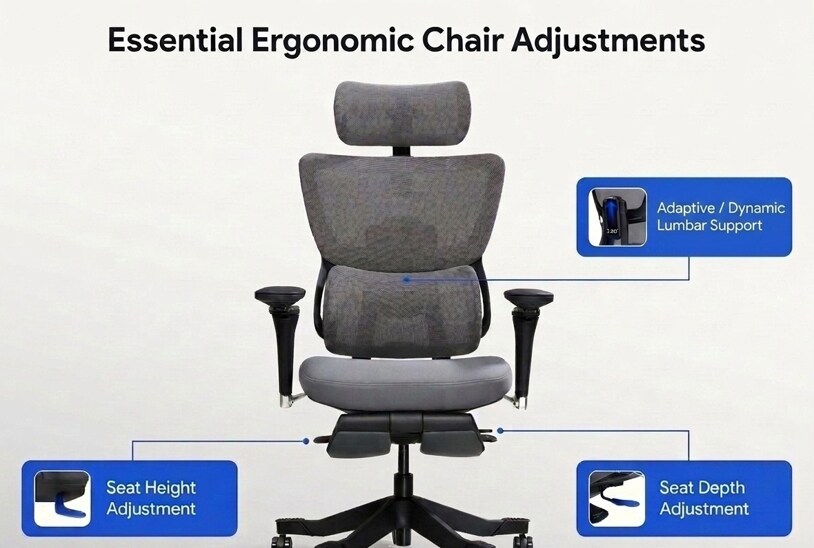
The most valuable ergonomic office chair features are seat height adjustment, lumbar support, seat depth adjustment, and adjustable armrests. Lumbar support can come from an adjustable mechanism or a well-designed fixed curve. The key is whether it matches your lower back.
Before comparing individual features, it helps to understand their overall importance.
| Ergonomic Chair Feature | Why It Matters | Priority |
| Seat height adjustment | Creates a stable sitting foundation | Essential |
| Lumbar support (adjustable or well-designed fixed) | Supports the natural curve of the lower back | Essential |
| Seat depth adjustment | Improves thigh support and overall fit | Essential |
| Adjustable armrests | Helps maintain relaxed shoulders | Important |
| Recline mechanism | Encourages movement throughout the day | Important |
| Headrest | Provides support during reclining or relaxed sitting | Comfort upgrade |
| Footrest | Useful for specific work styles or relaxation | Comfort upgrade |
| Forward tilt | Helpful for active sitting or task-intensive work | Comfort upgrade |
Priority Features in an Ergonomic Chair
| Priority | Features |
| Essential | Seat height, lumbar support (adjustable or fixed), seat depth |
| Important | Armrests, recline mechanism |
| Comfort upgrades | Headrest, footrest, forward tilt |
Seat Height Adjustment: The Foundation of a Good Fit
Seat height is one of the most fundamental ergonomic chair adjustments, yet it is often set incorrectly.
A properly adjusted seat height allows your feet to rest flat on the floor, your knees to remain level with or slightly below your hips, and your weight to be distributed evenly across the seat pan.
Suggested Starting Seat Height by User Height
The chart below provides a useful starting point. Because body proportions vary from person to person, these ranges are only a general guide. Always fine-tune the chair based on your posture rather than your height alone.
| User Height | Suggested Starting Seat Height* |
| 5'0"–5'3" (152–160 cm) | 15–17 in (38–43 cm) |
| 5'3"–5'7" (160–170 cm) | 16–18 in (41–46 cm) |
| 5'7"–6'0" (170–183 cm) | 17–19 in (43–48 cm) |
| Over 6'0" (183+ cm) | 18–21 in (46–53 cm) |
*Use these values as a starting point only. The correct seat height depends on individual leg length, footwear, and desk setup. Always make final adjustments based on your sitting posture. Most ergonomic office chairs offer a seat height range of approximately 16 to 21 inches (41–53 cm), which accommodates many adults. Shorter or taller users may need chairs with a wider adjustment range.
Quick Fit Checklist
After adjusting the seat height, confirm these four signs:
✓ Both feet rest flat on the floor.
✓ Knees are level with or slightly below your hips.
✓ Thighs are evenly supported without excessive pressure.
✓ You can sit fully against the backrest without pressure behind your knees.
When the seat height is incorrect, other adjustments become less effective.
If your seat is too high, your feet may dangle or press against the floor, shifting pressure to the backs of your thighs and affecting your lower back posture.
If your seat is too low, your hips may sit below your knees, which can encourage a rounded lower back position.
Seat height should always be adjusted first. Once it is set correctly, you can fine-tune lumbar support, seat depth, armrests, and recline to achieve a more balanced sitting posture.
--altImgStart--{"link":"https://s3.springbeetle.com/prod-us2-bucket/ergonomic-office-chair-seat-height-adjustment-guide_20260810_9wFPKaZ0.png","alt":"Diagram illustrating proper seat height adjustment on a Flexispot ergonomic office chair, showing feet flat on the floor and knees level with hips."}--altImgEnd--
Lumbar Support: A Key Feature for Long Sitting Sessions
Among all ergonomic chair features, lumbar support is often one of the first features people consider, and for good reason. However, effective lumbar support doesn't always require a highly adjustable mechanism. Some chairs use a fixed lumbar curve that works well for many users, while others offer adjustable or dynamic systems that adapt to different body types and sitting positions. Both approaches can be effective when they match the user's needs.
A chair with effective lumbar support helps fill the gap between your lower back and the backrest, allowing your spine to remain closer to its natural alignment.
However, lumbar support is not simply about adding more padding or creating a stronger outward curve.
--altImgStart--{"link":"https://s3.springbeetle.com/prod-us2-bucket/ergonomic-chair-lumbar-support-adjustment-guide_20260810_VBpYjpT0.png","alt":"A diagram showing a person sitting in a FlexiSpot professional ergonomic office chair with correctly adjusted lumbar support matching the natural curve of the lower back."}--altImgEnd--
Why Adjustable Lumbar Support Makes a Difference
People have different body proportions, and the position of the lower back curve varies from person to person. Some users benefit from a highly adjustable lumbar system, while others find that a well-designed fixed lumbar curve provides adequate support. The best approach depends on your body type, how long you sit, and whether you tend to change positions frequently throughout the day.
If you choose a chair with adjustable lumbar support, look for options such as:
- Height adjustment: Positions support where your lower back needs it most
- Depth adjustment: Controls how much pressure is applied
- Firmness adjustment: Allows users to choose a softer or stronger level of support
An alternative to manual adjustment is dynamic lumbar support. Instead of requiring users to constantly adjust the lumbar position, these systems use springs or linkage mechanisms that automatically respond to body movement. As you lean, shift, or change posture, the lumbar support moves with your lower back to help maintain consistent contact. For users who prefer a low-maintenance setup, this can be a practical choice. However, it's not inherently better than a well-adjusted manual system. The right choice depends on personal preference and how you use your chair.
The goal is not to push your lower back forward as much as possible. The goal is to provide gentle support while allowing your spine to maintain a natural position.
Does Lumbar Support Help With Back Pain?
Many people search for an ergonomic chair for back pain because they hope a better chair can eliminate discomfort. While an ergonomic chair cannot address every cause of back pain, proper lumbar support may improve sitting comfort by providing better support during seated work. Whether that support comes from an adjustable mechanism or a well-designed fixed lumbar curve, the key is whether it matches your body's natural alignment.
A chair may be more helpful when combined with other adjustments, such as:
- keeping your feet supported
- adjusting seat height correctly
- changing positions regularly
- maintaining a comfortable monitor and desk setup
In other words, lumbar support works as part of a complete ergonomic setup rather than as a standalone solution.
Seat Depth Adjustment: The Overlooked Feature Many Buyers Miss
When people compare ergonomic office chairs, lumbar support and armrests often receive the most attention. However, seat depth adjustment is one of the features that can have a major impact on daily comfort, especially for people who spend several hours sitting at a desk.
The seat depth determines how much support your thighs receive and how your lower body connects with the rest of the chair. Even a chair with excellent lumbar support may feel uncomfortable if the seat pan is too deep or too shallow for your body.
--altImgStart--{"link":"https://s3.springbeetle.com/prod-us2-bucket/ergonomic-chair-seat-depth-adjustment_20260810_Fk9kLimK.png","alt":"Close-up view demonstrating proper seat depth adjustment with a finger gap between the seat edge and the back of the knees."}--altImgEnd--
How Seat Depth Affects Daily Comfort
A properly adjusted seat should support most of your thighs while leaving enough space between the edge of the seat and the back of your knees.
If the seat is too deep, several issues may occur:
- The edge of the seat may press against the back of your knees
- Your lower legs may feel uncomfortable after extended sitting
- You may naturally slide forward to find a more comfortable position
- Your lower back may lose contact with the backrest
If the seat is too shallow, your thighs may not receive enough support, which can create additional pressure around the hips and increase fatigue during long work sessions.
The correct seat depth allows you to use the backrest fully without creating pressure behind your knees.
According to the Occupational Safety and Health Administration's (OSHA) Computer Workstations eTool, a properly adjusted seat should allow the user to sit fully against the backrest without the front edge of the seat pressing against the back of the knees.
Why Seat Depth Is Often More Important Than Extra Padding
Many office chairs use thick cushions or plush materials to create a comfortable first impression. While cushioning can improve initial comfort, it does not necessarily provide better ergonomic support.
A softer seat cannot solve a poor fit.
For example, a thick cushion may feel comfortable for the first few minutes but create pressure points if the seat depth does not match your body proportions. On the other hand, a properly sized seat with moderate cushioning can provide more consistent support throughout the workday.
When evaluating an adjustable ergonomic chair, consider seat fit and adjustability before focusing only on how soft the seat feels.
Adjustable Armrests: Small Feature, Big Impact on Upper Body Comfort
Armrests are another feature that can influence posture more than many users expect.
Although they may seem like a simple place to rest your arms, properly adjusted armrests can affect the position of your shoulders, neck, and upper back during computer work.
How Armrests Affect Posture
When armrests are positioned too low, users often compensate by raising their shoulders slightly or leaning forward to reach the desk.
When armrests are too high, they may prevent the chair from moving close enough to the desk, forcing the user into a forward-leaning position.
Both situations can contribute to unnecessary tension around the shoulders and neck.
A well-adjusted armrest should allow your shoulders to remain relaxed while your elbows stay comfortably supported.
Which Armrest Adjustments Matter?
Modern ergonomic chairs may offer several types of armrest adjustments, including:
- Height adjustment: This is the most important function. It helps position your arms at a comfortable level while typing or using a mouse.
- Width adjustment: Useful for matching different shoulder widths and keeping the arms in a natural position.
- Depth adjustment: Allows the armrests to move closer or farther from your body, which can improve support when working at different desk heights.
- Pivot adjustment: Allows the arm pads to angle inward or outward depending on your preferred arm position.
However, more adjustment does not automatically mean better ergonomics. The most useful armrests are the ones that help you maintain a relaxed working posture.
Why Recline and Movement Matter in an Ergonomic Chair
A common misunderstanding about ergonomic chairs is that the goal is to maintain one “correct” sitting position all day.
In reality, the human body is not designed to remain completely still for extended periods.
A good ergonomic chair should support movement while maintaining comfort and stability.
Why Reclining Matters
A reclining backrest allows users to change their sitting angle throughout the day. This can reduce the pressure created by staying in one fixed position for too long.
Different recline positions may serve different purposes:
- More upright positions: Useful for focused tasks such as typing and meetings
- Moderate recline: Comfortable for general computer work
- Deeper recline: Better suited for reading, relaxing, or taking short breaks
A flexible recline mechanism gives users more options instead of forcing the body into a single posture.
Dynamic Sitting vs Perfect Posture
Many people assume an ergonomic posture chair should keep the body perfectly straight. However, ergonomic research increasingly emphasizes the importance of changing positions throughout the day.
Small movements, such as shifting your sitting angle or leaning back briefly, can help reduce the physical stress of prolonged sitting.
The purpose of an ergonomic chair is not to lock your body into place. It is to provide support while allowing natural movement.
Ergonomic Mesh Office Chair vs. Upholstered Chair: Which Is Better?
When choosing an ergonomic office chair, many buyers focus on the chair's appearance and materials. One common question is whether an ergonomic mesh office chair is better than a chair with a padded or upholstered backrest.
The material itself does not determine whether a chair is ergonomic. The more important factor is whether the backrest can provide consistent support while allowing comfortable movement.
Mesh vs Upholstered Comparison
| Factor | Mesh Back | Upholstered Back |
| Breathability | High airflow, stays cool | Less airflow, can retain heat |
| Flexibility | Responds to movement | Provides a more structured feel |
| Feel | Firmer, responsive | Softer, cushioned |
| Best for | Warm environments, long sitting sessions | Relaxed reading, shorter work sessions |
How to Choose Between Mesh and Upholstered Materials
Choose mesh if you:
- sit for long periods and prefer better airflow
- work in a warmer environment
- prefer a firmer, more responsive feel
- like a minimalist office setup
Consider upholstered materials if you:
- prefer softer cushioning
- spend time reading or relaxing in your chair
- value a more traditional appearance
The best ergonomic chair is the one that supports your body consistently throughout the day, regardless of the material used.
Features That Depend on Personal Preference
Modern ergonomic chairs often include additional features designed to improve comfort. Some of these features can be valuable, but they are not equally important for every user.
Headrests: Helpful for Some Sitting Styles, Not Essential for Everyone
A headrest is one of the most noticeable features on an ergonomic chair, but its value depends heavily on how you use your chair.
For users who spend most of the day sitting upright and working at a computer, a headrest may not provide much additional support. However, it can be useful when reclining during breaks, attending long meetings, reading documents, or relaxing after work.
The key is to view a headrest as a comfort feature rather than the foundation of ergonomic support.
Footrests: A Useful Addition, But Not a Universal Requirement
A built-in footrest is not necessary for most traditional desk work. For everyday computer tasks, the priority should be:
- feet supported on the floor or a stable surface
- knees positioned comfortably
- hips and lower back properly supported
A footrest becomes more useful in situations where users frequently recline for reading or relaxation, take short breaks in their chair, or use a higher desk setup.
Advanced Adjustments: More Options Do Not Always Mean Better Support
Some ergonomic chairs advertise advanced features such as multiple recline locking positions, adjustable tension controls, 4D armrests, and adjustable seat angles.
These features can improve customization, but only when users understand how to adjust them properly.
A chair with many settings may feel complicated if users never change them. Meanwhile, a chair with fewer but more practical adjustments may provide a better everyday experience.
The goal of ergonomic design is not maximum complexity. It is creating a setup that fits your body and supports your natural movement.
How to Prioritize Ergonomic Chair Features When Choosing a Chair
With so many options available, it can be difficult to decide which features deserve the most attention.
Instead of choosing a chair based on the longest feature list, consider your own working habits first.
If You Sit for 8 or More Hours a Day
Prioritize these essential features before paying for optional upgrades. Long work sessions require consistent support and the ability to change positions throughout the day.
If You Experience Lower Back Discomfort
Look for adjustable lumbar support, supportive seat design, recline functionality, and proper seat depth. A chair may improve sitting comfort, but it should be part of a broader ergonomic setup that includes desk height, monitor position, and regular movement.
If You Experience Neck and Shoulder Tension
Prioritize properly adjusted armrests, appropriate desk height, and comfortable recline support. Many neck-related discomfort issues are not caused by the headrest itself. They are often connected to shoulder position, screen height, and how the upper body is supported while working.
If You Have a Smaller Body Frame
Prioritize adjustability. Important features include seat depth adjustment, seat height range, armrest positioning, and lumbar support placement. A chair designed around adjustability is more likely to accommodate different body proportions.
Quick Summary: Feature Priority by Need
| Your Situation | Focus On |
| 8+ hours per day | Lumbar support + seat depth + recline + armrests |
| Lower back discomfort | Lumbar support + recline + seat depth |
| Neck / shoulder tension | Armrests + desk height compatibility |
| Smaller body frame | Seat depth + height range + adjustability |
Common Questions About Ergonomic Chair Features
1. What features should I look for in an ergonomic office chair?
The most important ergonomic chair features are lumbar support (whether adjustable or fixed), seat depth adjustment, seat height adjustment, and armrests that help maintain a comfortable working position. Additional features such as headrests, footrests, and advanced adjustments can improve comfort but depend on individual preferences and work habits. A chair with fewer well-designed adjustments may provide better support than one with many features that do not match your body.
2. Do I really need an ergonomic office chair?
Not everyone needs a highly adjustable ergonomic chair. If you sit for short periods or work from a variety of locations, a simpler chair may meet your needs. However, if you spend several hours at a desk each day, the right ergonomic features can reduce discomfort and support long-term comfort. The key is matching the chair to your work habits rather than assuming a more expensive chair is automatically better.
3. What is the most important feature of an ergonomic chair?
Lumbar support is often one of the first features people consider because it helps support the natural curve of the lower back during seated work. However, effective lumbar support doesn't have to be adjustable. Some chairs use a fixed lumbar curve that works well for many users, while others offer dynamic systems that move with your body. The key is finding a chair where the lumbar region matches your lower back, whether through adjustment, fixed design, or automatic response. A chair works best when lumbar support is combined with proper seat height and seat depth adjustment.
4. Does an ergonomic chair with lumbar support help with back pain?
An ergonomic chair with lumbar support may help improve sitting comfort by supporting the natural curve of the lower back and reducing strain caused by poor positioning. However, back discomfort can have many causes, and a chair alone cannot solve every issue. A complete ergonomic setup also includes proper desk height, monitor placement, and regular movement throughout the day.
5. Are more adjustable ergonomic chairs always better?
Not necessarily. More adjustments can provide greater customization, but only if they are useful for your body and working style. A chair with excessive features may add complexity without improving comfort. The most valuable adjustments are the ones that help you maintain a balanced posture and change positions naturally.
6. What type of office chair is best for posture?
The best ergonomic posture chair is one that supports a neutral sitting position without forcing your body into a rigid posture. Important features include adjustable lumbar support, a properly sized seat, supportive armrests, and the ability to recline and move throughout the day. Good posture is not about staying perfectly still. It is about creating a comfortable position that can be maintained while allowing natural movement.
7. Is a mesh ergonomic office chair better than a padded chair?
Neither option is automatically better. An ergonomic mesh office chair can provide better airflow and a flexible sitting experience, while a padded chair may offer a softer feel. The most important factors are whether the chair provides proper support, fits your body proportions, and allows comfortable movement.
8. Do ergonomic chairs help with neck pain?
An ergonomic chair may help reduce factors that contribute to neck discomfort by improving upper body support. Features such as adjustable armrests, proper seat height, and a supportive recline mechanism can help reduce shoulder tension and encourage better alignment. However, neck discomfort is often related to the entire workstation setup, including monitor height, keyboard position, and sitting habits.
About the Authors & Technical Accuracy
By the FlexiSpot Ergonomic Research Team
Reviewed by members of our Product Engineering Team for technical accuracy. Our team brings over a decade of combined experience in designing, testing, and refining ergonomic seating and height‑adjustable workstations, with insights gathered from thousands of office professionals across North America.
References
- Occupational Safety and Health Administration (OSHA). Computer Workstations eTool: Checklists - Evaluation. Available at: https://www.osha.gov/etools/computer-workstations/checklists/evaluation