
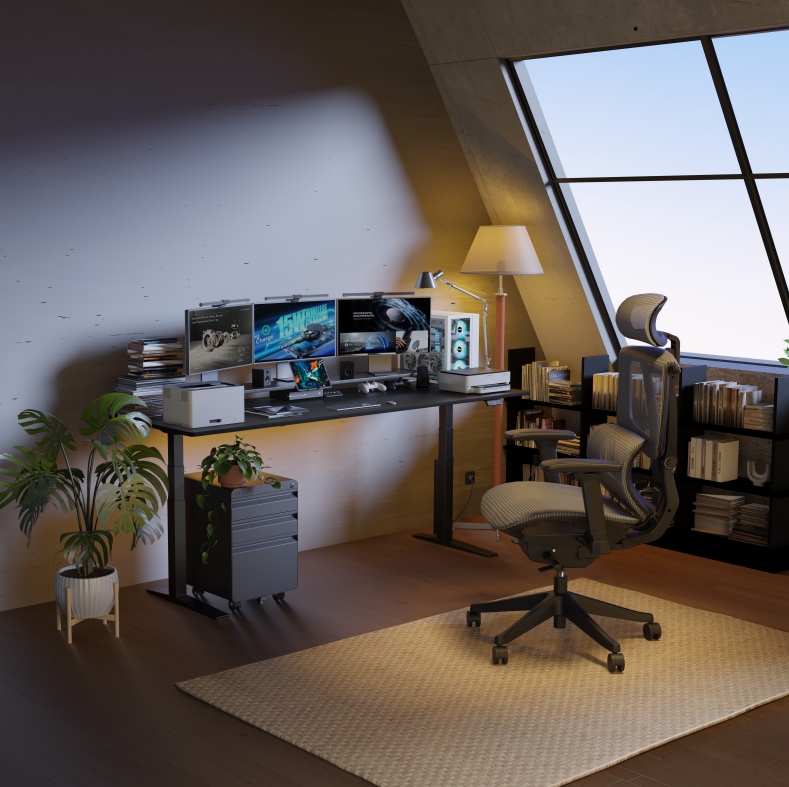
Most people think buying a standing desk is mainly about finding the right size or staying within budget.
But after a few weeks of actually using one, the real issues usually show up somewhere else — the desk feels less stable than expected at standing height, dual monitors slowly take over the entire surface, cables start to pile up, and your keyboard position feels slightly off depending on whether you are sitting or standing.
What starts as a simple workstation often turns into a multi-monitor setup with monitor arms, audio gear, lighting, and multiple devices competing for space.
That’s when most people realize the same thing: they didn’t just buy a desk — they built a workspace system.
Here are the most common standing desk setup mistakes people realize too late, and how to avoid them before upgrading your workspace.
1. Choosing a Desk Based Only on Price
You set up your new desk. Dual 27-inch monitors. A desktop PC. Speakers. A webcam. You raise it to standing height for the first time and start typing.
And you notice it — a slight wobble in the monitors. A bit of movement through the frame. Nothing extreme, but enough to break focus over time.
Why this happens in real setups
Budget-friendly desks often feel completely fine at sitting height. The difference only becomes noticeable when the desk is fully raised and carrying a heavier setup. Is a standing desk good for you? Yes, but only if you avoid the instability trap that comes with cutting corners.
In real-world use, a few factors start to matter more:
- Lighter frame construction can transmit small movements more easily at standing height.
- Single-motor systems may feel less consistent when handling heavier, multi-monitor setups. However, this is not caused by the motor alone. Many entry-level single-motor desks also use slimmer two-stage lifting columns and lighter frame structures to reduce cost, which can affect overall stability at taller heights.
- Slimmer structural designs can feel less rigid once monitor arms and accessories are added.
None of these mean the desk is “bad.” They just reflect the difference between a light setup and a real working or gaming workstation.
What works better for heavier setups
If your workspace includes dual monitors or multiple devices, look for:
- A dual-motor lifting system for smoother, faster, and more balanced height adjustments under heavy loads.
- A reinforced steel frame design that offers improved structural rigidity for daily, high-frequency use.
- A four-leg structure option if you are building an extra-wide or heavy multi-device setup that requires maximum foundational support.
These configurations are especially noticeable once your setup grows beyond a simple laptop or single-monitor layout.
For dual-monitor or heavy setups, prioritize stability-focused frame and motor systems instead of focusing only on price.
2. Underestimating How Much Space Dual Monitors Actually Need
--altImgStart--{"link":"https://s3.springbeetle.top/prod-common-bucket/commodity/item/1028_file_Comparison%20between%20shallow%20and%20deep%20standing%20desk%20setups%20for%20dual%20monitors%20and%20monitor%20arms._20260529_6DsVogPS.png","alt":"Comparison between shallow and deep standing desk setups for dual monitors and monitor arms."}--altImgEnd--
You measure your desk: 24 inches deep. It sounds more than enough.
Then you set everything up — and suddenly it feels smaller than expected. Monitor arms extend backward. Speakers take side space. A microphone arm overlaps your keyboard area. Everyday items like lighting, chargers, and notebooks slowly fill the remaining space.
Why desk width is only part of the equation
Most people only think about screen width. But a real desk for dual monitors includes:
- Monitor arms extending behind displays.
- Keyboard and mouse movement space.
- Audio equipment or speakers.
- Everyday workspace items.
This is why even “wide” desks can start feeling tight once fully used.
The missing factor: depth
Depth often matters more than width in real usage.
On shallower desks, monitors end up closer than the ideal viewing distance, especially with larger screens or heavy monitor arms. Over time, this can lead to eye strain and discomfort during long work or gaming sessions.
What actually works better
- A deeper desktop surface (around 28–30 inches) generally helps maintain a more comfortable viewing distance for dual-monitor setups, especially when using larger displays or monitor arms.
- A monitor arm setup helps reclaim usable space directly under the screens.
- Larger surfaces help separate the active typing workspace from the display zone.
For long hours of editing, coding, or multitasking, usable depth matters more than minimal aesthetics to build your desk space.
For dual monitors, prioritize desk depth over width. A deeper surface often improves comfort more than extra horizontal space.
3. Buying a Gaming Desk That Looks Good but Feels Cramped
Many gaming desks look perfect online — compact layout, RGB lighting, clean visuals.
But real use is very different.
After setup, the mousepad takes up most of the surface. The second monitor feels slightly squeezed. A microphone arm interferes with movement. And during fast gameplay, the desk feels more limited than expected.
Why gaming setups outgrow their desks
--altImgStart--{"link":"https://s3.springbeetle.top/prod-common-bucket/commodity/item/1028_file_Modern%20gaming%20standing%20desk%20setup%20with%20dual%20monitors,%20RGB%20lighting,%20ergonomic%20gaming%20chair,%20desktop%20PC,%20and%20matte%20black%20desktop%20in%20a%20home%20office._20260529_qEyWNL9t.png","alt":"Modern gaming standing desk setup with dual monitors, RGB lighting, ergonomic gaming chair, desktop PC, and matte black desktop in a home office."}--altImgEnd--
What size gaming desk should I get? It's a common question because gaming setups rarely stay minimal:
- Mouse movement space becomes more important for low-sensitivity players who need wide swipes.
- Dual monitors are common for gaming + communication, Discord, or live streaming.
- Audio gear, mixers, and charging docks gradually expand across the desk.
What looked compact and aesthetic becomes restrictive in real usage.
Stability matters more than people expect
For many gaming setups, a 27–28 inch depth can still work well when paired with monitor arms and efficient cable management. Fast movements, leaning forward, or adjusting equipment can expose instability in lighter frames. Even small vibrations in your monitors can become noticeable during longer gaming sessions.
What works better for gaming setups
- A larger desktop surface (around 60–70 inches wide) for dual-monitor and gaming gear setups.
- A more rigid steel frame design for better stability during fast mouse movements.
- A wider leg structure design for improved stability, comfort, and legroom.
- A textured desktop surface (such as a matte or anti-glare finish) to help reduce reflections from gear and minimize visible wear.
Many experienced gamers eventually prioritize stability and usable space over visual features alone.
For gaming setups, prioritize space, stability, and long-session comfort over visual design elements.
4. Realizing Too Late That Stability Changes Everything
At first, everything feels fine at standing height.
Then small details start to appear — slight monitor movement when typing, subtle frame vibration when leaning forward, or minor shifting during daily use.
Over time, these small movements become hard to ignore.
Why stability changes at standing height
Are standing desks worth it? They are, but a desk that feels stable while sitting can behave differently once raised.
- Two-leg frames can allow more noticeable front-to-back movement under active use at higher positions.
- Thinner lifting structures may feel less rigid at elevated heights.
- Narrow support bases can transmit movement more easily during heavy typing or leaning.
These effects become more noticeable as setups become heavier, especially with ultrawide monitors or desktop PCs.
--altImgStart--{"link":"https://s3.springbeetle.top/prod-common-bucket/commodity/item/1028_file_Comparison%20of%20two-leg%20and%20four-leg%20standing%20desk%20frame%20stability%20at%20standing%20height._20260529_9wX46wUB.png","alt":"Comparison of two-leg and four-leg standing desk frame stability at standing height."}--altImgEnd--
What improves stability in real use
- A four-leg structure design helps distribute weight evenly across four support points to minimize sway.
- A reinforced frame system with cross-support structures improves overall rigidity.
- A stronger lifting column design can improve stability at higher positions at higher positions.
For users with heavy multi-monitor setups or creator gear, structural stability often becomes the most important long-term comfort factor.
If your setup includes multiple monitors or heavier equipment, stability at standing height becomes just as important as desk size.
5. Forgetting That Standing Height Is Different for Everyone
Many people rely on generic height charts when setting up a standing desk. But in real use, there is no universal perfect height.
Why generic height charts fall short
Comfort depends on several interconnected factors:
- Arm length and shoulder position.
- Keyboard position and desktop thickness.
- Footwear differences (anti-fatigue mat, shoes, or barefoot).
- Monitor height and viewing angle.
Even two people of the same height may need completely different desk settings. Is standing at a desk better than sitting? Yes, but only if the height is dialed in perfectly to your unique body proportions.
How High Should a Standing Desk Be?
To find your most natural ergonomic position and know exactly how tall should a standing desk be, use the elbow-position test:
| Your Height | Ideal Standing Height | Recommended Configuration Consideration |
| 5'4" (163 cm) | 39.5" (100 cm) | May benefit from a 3-stage lifting column for lower reach |
| 5'8" (173 cm) | 42.5" (108 cm) | Standard range / widely supported |
| 6'0" (183 cm) | 45.5" (116 cm) | Benefits from a higher-position stability design |
| 6'4" (193 cm) | 49.5" (125 cm) | Requires an extended height adjustment range |
Stand naturally, relax your shoulders, and bend your elbows to about 90 degrees. The height from the floor to your forearms is your ideal standing desk height.
--altImgStart--{"link":"https://s3.springbeetle.top/prod-common-bucket/commodity/item/1028_file_Proper%20standing%20desk%20height%20based%20on%20elbow%20position%20and%20ergonomic%20posture._20260529_EMw8F2qc.png","alt":"Proper standing desk height based on elbow position and ergonomic posture."}--altImgEnd--
What helps long-term comfort
- A wide height adjustability range ensures the desk works comfortably across different users and setups.
- Height memory presets make switching between sitting and standing fast and effortless.
This is especially useful in shared home office environments where you frequently alternate to find if a standing desk is better than sitting for long hours.
6. Thinking L-Shaped Desks Are Only for Large Offices
L-shaped desks are often seen as oversized office furniture meant for corporate spaces. In reality, they solve a very common home workspace problem: separation of tasks.
Why L-shaped layouts work
Instead of forcing everything onto one surface, an L-shape allows natural zoning:
- Side A: Main monitors, gaming, or focused creative work.
- Side B: Writing, meetings, or secondary devices.
This separation helps reduce clutter and improves workflow clarity.
Real-world benefits
- Better separation between focused work and casual tasks.
- Easier access to frequently used items within arm's reach.
- More natural multi-device setup for hybrid workflows.
What matters in L-shaped standing desks
- Synchronized multi-motor lifting systems help both sides move evenly during height adjustment without any tilting.
- Reinforced corner support improves long-term stability across the entire L-shaped structure.
- Larger corner layouts provide enough usable space for multi-monitor or hybrid setups without crowding the room.
For users balancing gaming, remote work, or creative workflows, L-shaped setups often improve both comfort and productivity.
If your workspace feels constantly crowded, an L-shaped setup may significantly improve usability.
Frequently Asked Questions
1. Is a standing desk good for you, and is standing better than sitting?
Yes, a standing desk can be beneficial for your health, but balance is key. Long-term studies show that alternating between sitting and standing may help reduce spinal compression, support better energy levels, and improve comfort during long work sessions. However, standing all day is not necessarily better than sitting all day. Ergonomic experts generally recommend standing for 15 to 30 minutes for every hour spent sitting to maintain a more balanced routine.
2. How high should a standing desk be when standing or sitting?
There is no universal height, as it depends on your body proportions. To find your most comfortable ergonomic setting, use the elbow test: bend your elbows at a 90-degree angle with your shoulders relaxed. Your desk height should align with the underside of your forearms.
For quick reference, a person who is 5'8" (173 cm) typically uses a sitting height of around 26.5 inches and a standing height of around 42.5 inches, depending on footwear and desk setup.
3. How do I choose the best standing desk for dual monitors?
When configuring a desk for dual monitors, desk depth is just as important as width. A desktop depth around 28 to 30 inches is often more comfortable for maintaining proper viewing distance, especially when using monitor arms or larger displays.
It is also helpful to choose a frame with a dual-motor lifting system or a four-leg structure, as these configurations tend to provide better stability for heavier multi-screen setups during everyday use.
4. What size of a normal gaming desk should I get?
For a standard gaming setup, desks around 55–60 inches wide with roughly 27–30 inches of depth are commonly used for dual-monitor and accessory-heavy setups. Gaming setups tend to expand over time with additional monitors, audio equipment, and accessories.
A wider frame with a textured or matte desktop surface can help accommodate larger mouse movements and reduce glare from lighting, especially in multi-monitor setups.
5. Are standing desks worth it if I have a heavy or complex desktop setup?
Traditional two-leg standing desks may show some movement at higher positions when supporting heavier setups. However, a well-configured standing desk system can still be a useful long-term upgrade for many users.
For setups with multiple monitors, desktop PCs, or heavier equipment, options such as reinforced four-leg desks or multi-motor L-shaped systems may help improve stability and reduce movement at standing height, depending on the configuration.
So, Are Standing Desks Actually Worth It?
For most users, the answer depends less on standing itself and more on how well the entire desk system supports daily real-world use.
A poorly planned desk setup can still feel cramped or unstable even at a premium price point. But a well-designed setup with enough depth, frame stability, ergonomic flexibility, and room to grow often feels significantly better over time.
The best standing desk setups are rarely the ones that look most impressive on day one.
They are the ones that still feel stable, comfortable, and functional months later — after your setup has naturally evolved with your real daily use.