
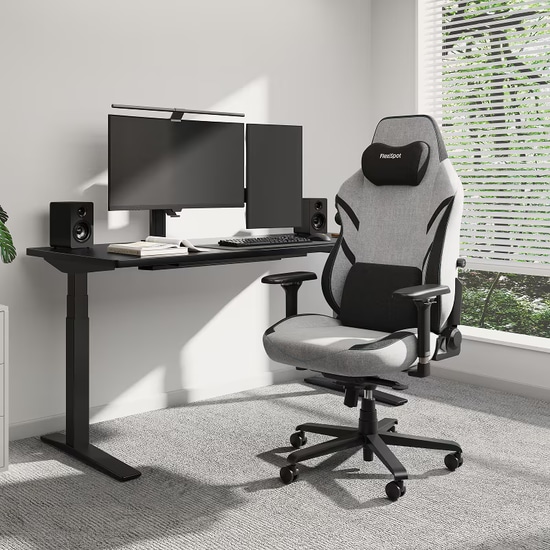
There are various gaming chairs available in physical stores and online with different features and price points. It can become challenging to purchase a product when you have a lot of choices. Well, at that point, the best thing to do is to prioritize the features you need while staying within your budget. Try to get the essentials first, and if your budget allows it, then you can consider those with additional features. So, what features are important in a gaming chair? This article discusses this in great detail, allowing you to make an informed choice with one of the most important pieces of gaming furniture.
Of course, this article predominantly focuses on PC gaming that involves desk use. However, if you are mainly a console gamer who uses a controller instead of a keyboard and mouse, you may also benefit from some of the products mentioned in this article.
What Features Are Important in a Gaming Chair?
We answer the question, "what features are important in a gaming chair?" below to help you pick a chair that has the features you need while remaining relatively affordable. We have listed the features from essential to useful but not necessary. We also mention some nearly essential features, which include those that you can do without, but it's better to have them.
Essential: Build-Quality and Durability
One of the most crucial factors that you should consider in an ergonomic chair for gaming is the build quality. Eliminate any choices of products by brands or manufacturers that do not have a reputation for producing high-quality products. It's crucial to remember that a chair is a long-term investment. You should expect it to last for several years of continuous use. So, the last thing you need is the upholstery wearing or some of the fixtures getting loose. Any compromised fixtures can weaken your gaming ergonomics, and that will be counterproductive to what your chair should accomplish.
For example, you should consider a product that has durable materials. All gaming chairs available at FlexiSpot are known for standing the test of time, giving you and various other gamers the perfect gaming solution for the long term.
Essential: Ergonomic Design
Another one of the most crucial features of an ergonomic gaming chair is its design. You should get one that has an ergonomic design to help prevent body strain, pains, or injuries. At the same time, an ergonomic design will help you perform to the best of your ability, which is especially useful for PC gamers who play competitively.
Some ergonomic design features that your chair should have include an S-shaped backrest. This type of backrest offers lumbar support, ensuring that your lower back is not being strained when you are sitting straight. In addition to that, some gaming chairs, like the ones sold by FlexiSpot, include removable lumbar pillows. These pillows are designed to help your lower back with the support it needs.
Remember that you will likely spend hours on the chair playing games or working (if you work from home). Thus, you need a chair that remains comfortable even when you sit in the same position for long periods.
Ergonomics is the practice of maximizing your efficiency by setting up your furniture and equipment in the ideal setting. In the context of gaming, it involves sitting in a position where your body is most comfortable yet helps you stay alert and focused. As a result, you'll reduce the risk of pain in your body, and you'll be able to play well at all times.
Essential: Height Adjustment
A feature that your gaming chair should have is height adjustment. The reason for that is that you need to be able to ensure that you are sitting at the correct height to limit strain on your lower back. Most gaming chairs include this feature to accommodate people of different heights. The ideal sitting position involves placing your feet on the ground and keeping your thighs relatively parallel to the floor. You can only achieve that if your chair has height adjustability.
Nearly Essential: Backrest Reclining Feature
You should consider buying an ergonomic gaming chair that has the ability to recline the backrest. The ideal backrest position is anywhere between 100 and 110 degrees. Avoid sitting with your backrest at 90 degrees even when you are setting up right. This is because 90 degrees is too upright, causing you to lean forward slightly, which puts unnecessary strain on your hips and lower back. Backrest reclining may not be the most useful feature in your ergonomic chair, but it certainly helps to get one with this feature.
Moreover, backcross reclining is also useful when you are using a controller to play your game. Using a controller does not require you to sit upright, so you can sit in a relaxed position by reclining your seat and playing your game.
Useful But Not Essential: A Headrest
A feature that is not essential but useful is a headrest. There's a good chance that you will not use the headrest when you are using the keyboard and mouse. This is because you are likely to sit upright, preventing you from leaning your head on the headrest. As long as you ensure that you are keeping your head in line with your back, you are likely not to experience neck strain.
A removable headrest pillow can be helpful in this case because it allows you to keep your neck straight without needing to lean back. However, it's best to get an ergonomic chair for gaming with a headrest (and reclining feature) if you switch between gaming with a keyboard and mouse and controller.
Useful But Not Essential: Adjustable Armrests
While armrests on a gaming chair are essential, you do not need to get a chair with adjustable armrests. Such chairs usually come at a higher price point. Therefore, it may not be worth spreading the extra money on this feature unless you really need to adjust your armrests. That said, you should note that adjustable armrests are not a gimmick. You can raise the height or bring it closer so that you support your shoulders and ensure your elbows are in the ideal position.
Useful But Not Essential: Casters for Extra Mobility
Almost all gaming chairs have it, but you don't necessarily need it when you use your chair just in front of your desk. We're talking about the casters, i.e., the wheels at the bottom of your chair. This feature helps improve mobility, which can be useful. However, you don't need it, especially if you don't move around on your chair in your room. So, if you can find a chair without them at a lower price, then don't put this as your top priority. Having said that, make sure you pick a chair with high-quality casters. If any breaks, your chair will no longer stay level.
Ergonomic Tips for Setting Up Your Gaming Furniture Properly
Below are some crucial ergonomic tips for setting up your gaming furniture properly so that you get the most out of your chair and desk.
Adjust your seat height so that your feet are flat on the ground and your thighs are almost parallel to the floor, with your hips at the same level or slightly higher than your knees
Keep your backrest reclined at a position between 100 and 110 degrees when sitting upright (more is acceptable when using a controller)
1. Sit upright with your lower back and the rest of your back touching the backrest
2. Ensure that your neck is in line with your back instead of leaning forward
3. Make sure that your elbows are at about 90 degrees (adjusting how far your seat is from your gaming desk) and your forearms are parallel to the floor, or your wrists are slightly below your elbows
4. Keep your wrists straight and your hands resting position (with one on the WSAD keys on the keyboard and the other on the mouse) at shoulder-width apart
5. Adjust your monitor height so that the upper half of the screen is at eye level, preventing neck strain and pushing your chin forward
6. Rest your palms when using your mouse and keyboard instead of resting your wrists
Final Words
We hope the answers to the question, "what features are important in a gaming chair?" are now clear. Budgeting when buying gaming furniture is essential because you can use your hard-earned money on other things, like better gaming hardware.