
Let’s Be Clear: "Elbow at 90°" Isn’t Specific Enough, Why This Common Tip Falls Short
You’ve probably heard “set your standing desk so your elbows hit 90°”—but here’s the issue: A remote worker who’s 5’2” using a home office nook and a professional who’s 6’5” in a dedicated workspace might both angle their elbows to 90°, yet their ideal desk heights can differ by several inches. Arm length directly scales with height, and that difference matters—desk height is never one-size-fits-all.
The Impact of Vague Advice: Discomfort & Strain
When you follow “elbow at 90°” without adjusting to your own body, your desk may end up too high or too low. Ergonomic research shows that even small mismatches in desk height can noticeably increase shoulder and back strain—two of the most common complaints among remote workers. A difference of just a couple of centimeters can make hours of work more tiring and less healthy. What we need are numbers that match your body, not just a generic angle.
Data-Driven Height: Fit Your Body with Feet & Inches
Trusted Data from Ergonomic Research & User Insights
Instead of vague angles, we rely on research-based ergonomic guidelines that connect user height with standing desk height. For example, studies and workplace health references indicate that someone around 5′8″ is most comfortable at about 38–39 inches, while a user around 6′0″ benefits from about 40–44 inches. These ranges are drawn from anthropometric data and user feedback—no guesswork, just evidence-based benchmarks that reflect how people actually work.
Your Go-To Standing Desk Height Chart
We simplified the ergonomic research into a chart that’s easy to use—just find your height range to get your perfect desk height:

Custom Height: Made for Your Routine
A Height Range That Fits Every Routine
These standing desks offer some of the most extensive height ranges on the market. For example, the E5 series adjusts from 23.6 to 49.2 inches, while the E7 frame covers 22.8 to 48.4 inches. The advanced 3-stage E7 Plus even reaches up to 51.6 inches, providing flexibility for different body types and work scenarios. This wide range makes it easier to find the most comfortable position—whether you’re studying, editing, or attending online meetings. To simplify daily use, the one-touch memory function lets you save up to three preferred heights, so you can switch between tasks without constant readjustment.
Practical Example: Using Adjustable Heights in Creative Work
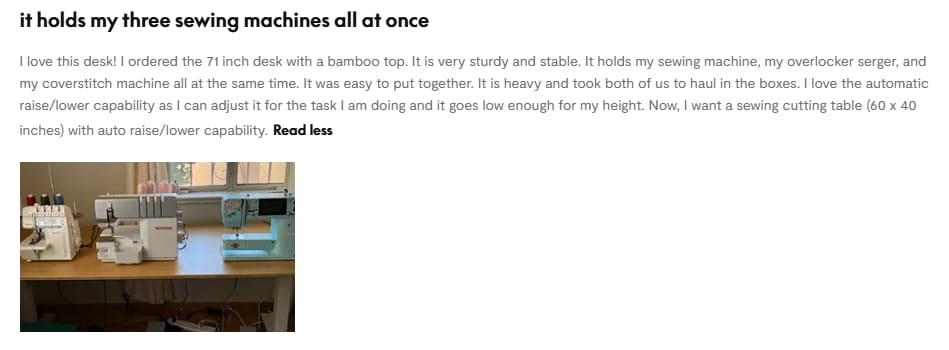
One sewing enthusiast shared that a 71-inch bamboo desktop gave her plenty of room to place a sewing machine, overlocker, and coverstitch machine all at once. She found the automatic height adjustment especially useful—keeping the desk low while operating the machines, and raising it higher for tasks like fabric cutting. Having multiple height options made her workspace more versatile, to the point where she even considered setting up a second table dedicated solely to cutting.
Mistakes to Avoid When Setting Your Desk Height
Copying Someone Else’s Height
It’s easy to think, “My coworker uses a 39-inch desk, so I should too.” But if they’re 5 feet 10 inches and you’re 5 feet 6 inches, that height may be too high for you. You’ll end up reaching or slouching, which leads to strain. Stick to ergonomic guidelines—your height, not someone else’s, determines what’s right for your body.
Forgetting Your Work Shoes
Heels, loafers, or sneakers—they all add height to your frame. Wearing 2-inch heels means your desk needs to be set 2 inches higher than if you’re barefoot. If you usually work with shoes on (as most of us do), measure your height while wearing them before adjusting your desk. It’s a small detail, but it ensures your setup fits how you actually work.
Conclusion
1. Ditch the “elbow at 90°” rule—it’s too vague. Use ergonomic guidelines or a height chart to get numbers that truly fit your body.
2. Modern standing desks offer a wide range (roughly 23–49 inches), covering almost every height and task. With one-touch memory, you can save your favorite settings and switch effortlessly.
3. Don’t forget small details like shoes or accessories—they play a big role in long-term comfort.
Grab your work shoes, measure your height, and check the chart. Adjust your desk today—you’ll feel the difference in your shoulders and back within a week!
FAQ: Your Standing Desk Height Questions Answered
Should I Adjust My Desk Height If I Use a Wrist Rest or Ergonomic Keyboard?
Yes—accessories can change how your arms interact with the desk. For example, a thick wrist rest raises your wrists slightly, so you may need to lower your desk by about half an inch to keep your elbows comfortable. Similarly, angled ergonomic keyboards may require a small height tweak. The fine adjustment available on modern standing desks makes it easy to fine-tune for these details.
Is FlexiSpot’s Max Height (47.2 Inches) Enough for Taller Users?
Absolutely. Ergonomic charts show that even someone who’s 6’8” usually only needs around 42–43 inches. A desk that goes up to about 47 inches leaves plenty of extra room for monitors, desk organizers, or a laptop stand—so you won’t run out of height, even with added gear.
How Often Should I Check My Desk Height?
At least twice a year, or anytime you change your regular work shoes (like from flats to heels), notice a posture change, or add new desk accessories (such as a thick keyboard tray). It only takes a moment to check the chart—and it helps keep your setup comfortable as your routine evolves.